News & Views
Steep Just Got a Lot More Powerful — Here’s What’s Changed
We scored Steep 6.5/10 a year ago for missing ratio metrics, version control, and row-level access. All three have now shipped, so we tested it again on our own account, and the ceiling’s moved, even if a few new quirks came with it.
Table of content
Back in January 2025, Tom Bassett wrote about how Steep’s metric-first approach to BI was something we genuinely believed in at Tasman. Enforcing a single definition of your north-star metrics, surfacing them intuitively for every person in the business — not just the technical ones — is a problem worth solving, and Steep had a compelling take on it.
But I’ll be honest. When we formally reviewed it later that year, we gave it a 6.5 out of 10. The philosophy was right but the execution clearly had gaps. In particular, three things frustrated us when developing:
No derived metrics. You couldn’t combine two metrics to create a ratio. “Revenue per user”? “Margin %”? Nope — you had to pre-calculate that in dbt and bring it in as a new field. A workaround, not a solution.
No version control within Steep. We were already doing proper dev → prod schema promotion in dbt, but Steep had no awareness of that cycle. Switching a metric from a dev schema to prod reset its entire configuration — a real headache on any serious engagement.
No row-level security. Fine for small teams, a blocker for anything where different users should see different slices of data.
These weren’t minor polish items. They were structural limitations that shaped whether or not Steep was the right fit for a client. So when Steep started shipping properly this year, we paid attention. We’ve been testing it in our own Tasman account and here’s what we found.
The big one: Define in Code
Released July 2026, Define in Code is the update that changes the conversation.
The full semantic model can now live in code — managed as YAML, version-controlled in Git, reviewed via pull requests, integrated into CI pipelines. Steep syncs automatically from your repository, with code as the source of truth. Crucially, anything defined in code works exactly the same as anything built through the UI: it goes straight into the metric catalogue, ready to explore.
What can you now define in code? Metrics, dimensions, slices, targets, access policies, cohorts, and — here’s the one we’ve been waiting for — entities and derived metrics.
Derived metrics let you build a ratio or calculation on top of existing metrics. You no longer need to pre-calculate “Conversion Rate” or “Average Revenue Per User” in the warehouse. Define Total Revenue and Total Users as metrics, then create a derived metric that divides one by the other. Steep handles the rest. This was our single biggest complaint about the platform — and it’s now resolved.
Entities take you one step further in the other direction: from an aggregated metric down to the individual rows that sit behind it. Think of it as the “drill-through” that traditional BI tools have always offered. You define which table or model holds those records, and users can click into a metric and see the underlying data. For teams used to jumping between Steep and their warehouse just to answer a follow-up question, this matters.
What we found when we tested it
We jumped into our Tasman account to start trialling things as soon as this dropped. A few honest observations from testing:
Modules are auto-created, and that creates some noise. Steep creates a module automatically for any metrics you build. These weren’t around when we first set up our TEP engagement in Steep, but it turns out Steep had been silently creating modules for every metric created — including ones built against dev schemas during development. That created a fair bit of clutter. It’s cleanable (and we’ve cleaned it up), but worth knowing going in: if you’re working across dbt_dev and dbt_prod schemas, you’ll want to be deliberate about which schemas Steep has access to before you start creating metrics, or you’ll end up with a messy module catalogue.
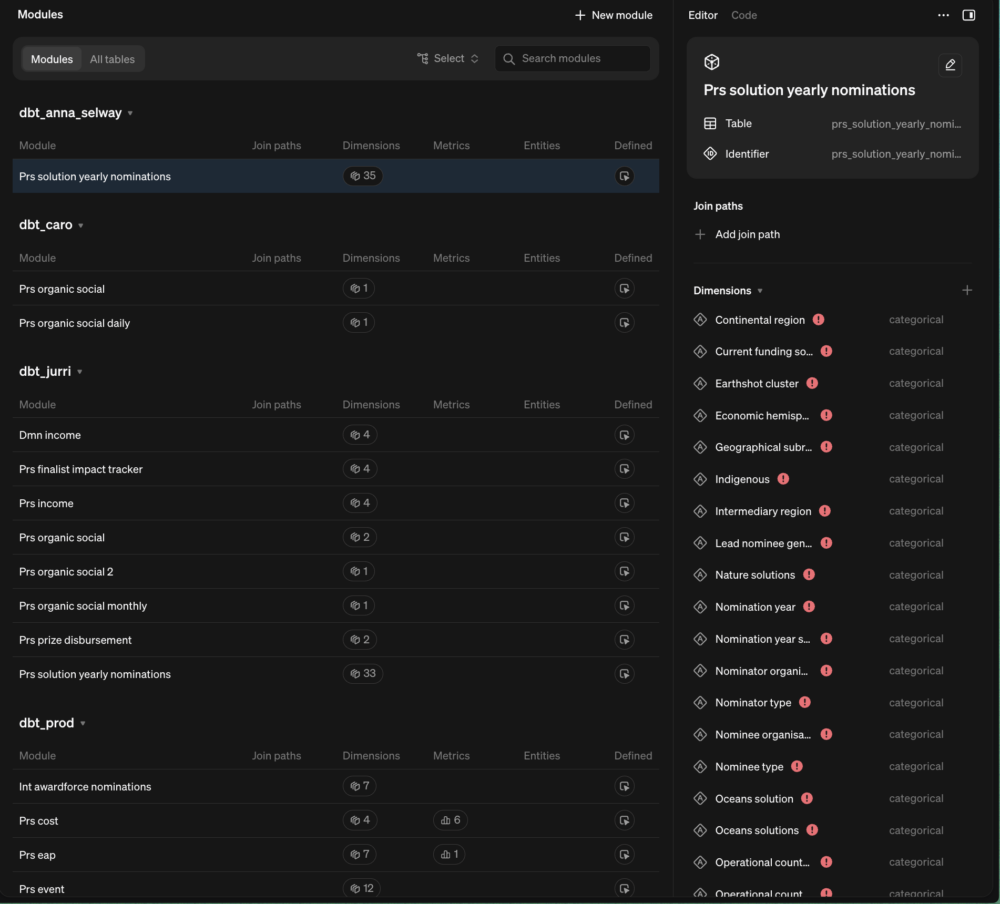
The joins story is nuanced if you’re already on dbt. A lot of what Define in Code enables — joining tables, creating structured relationships between datasets — is work we already do in dbt, through our dmn and prs model layers. The Tasman approach of modelling everything into presentation-ready tables before it hits Steep means we don’t lean heavily on Steep’s own join mechanism. That’s not a criticism — it’s just worth understanding your data stack before deciding how much of the semantic work you want to live in Steep vs. upstream in dbt.
Steep AI
Launched in March 2026, Steep AI is a natural language analytics agent built directly on your semantic model.
Ask it a question in plain English — “show me the number of CXP in the last 4 months per Tasmanita?” — and it uses your metric and dimension definitions to generate a real answer, not a hallucinated one. Because it’s querying through the same semantic layer that powers the rest of Steep, it respects your business logic, your access controls, and your metric definitions. It doesn’t freelance.
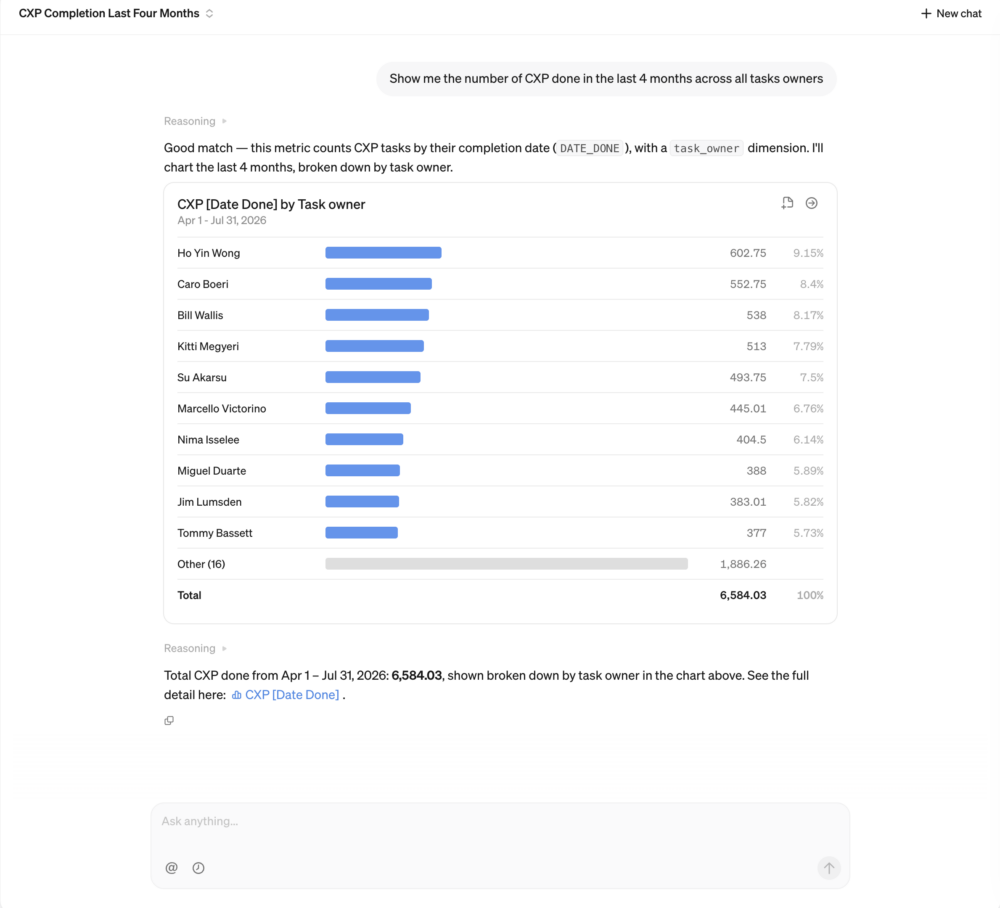
You can ask complex multi-part questions, refine the answers in the same conversation, and explore the metric catalogue using all the metadata and descriptions your data team has put in place.
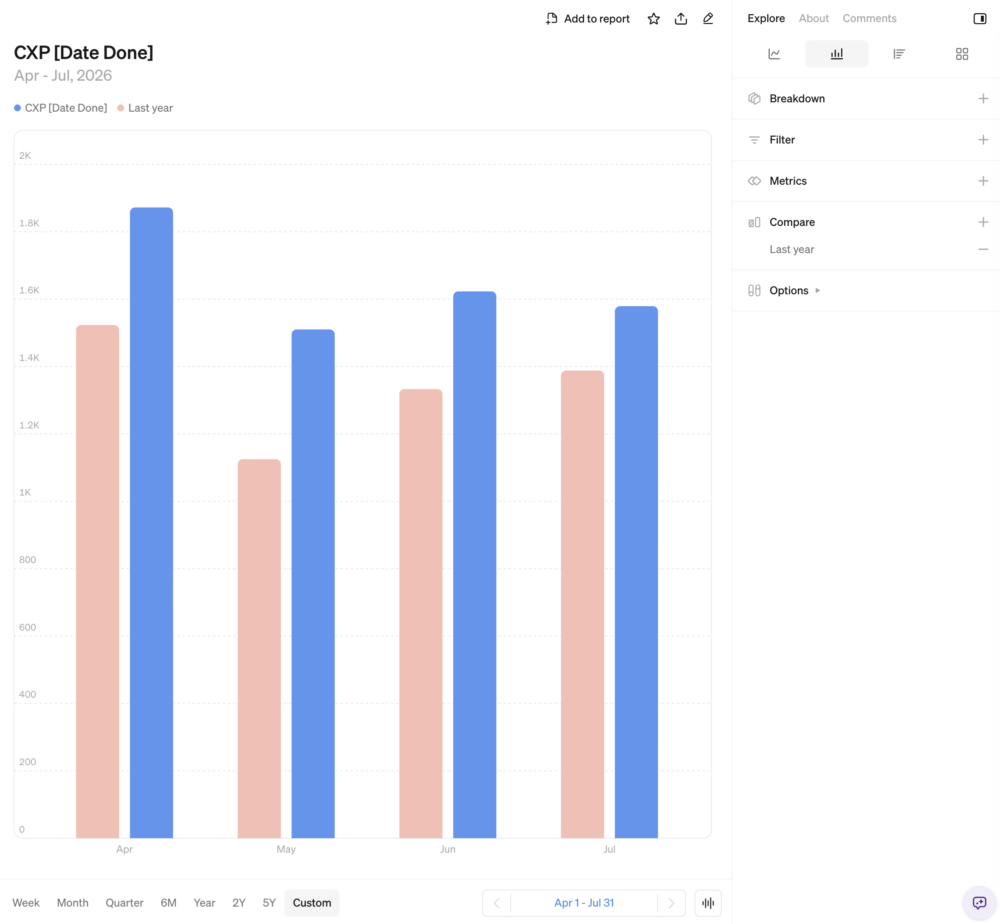
Exploring from the chat, allows you to add more breakdowns, specific filters, or time comparisons like the one below:
This is the right way to add AI to a BI tool. Rather than bolt-on chat that generates arbitrary SQL and hopes for the best, Steep AI queries through governed definitions. The answers are grounded in the same “version of truth” your whole company operates on. Whether the practical output is quite as impressive as the architecture is elegant — that’s something we’ll continue to test on real test scenarios.
Row-level security
Available on Enterprise plans from May 2026. Admins can now set access policies directly on any module in the semantic model, filtering the data a member sees based on their identity.
An account manager sees data for their accounts only. A regional lead sees data for their market. A partner portal user sees their firm’s data only. The policy applies automatically across every metric, entity, and report built on that module — including when Steep AI is querying on a user’s behalf.
Policies can be set based on user email or custom attributes, giving you a mapping table approach that’s straightforward to manage in your warehouse.
This was one of the clearest blockers for certain client use cases before. For multi-tenant setups, embedded analytics, or anything where data visibility needs to be finely controlled, it’s now a real option — on Enterprise pricing, at least.
Steep MCP
Released May 2026. Steep now has an MCP server (mcp.steep.app) that lets any MCP-compatible AI client — Claude, Cursor, Codex, VS Code — query your Steep workspace directly.
That means a developer in Cursor can ask “what were our top-performing campaigns last month?” and get an answer pulled from the same governed metric catalogue that the rest of the business uses. Authentication is handled via OAuth — the AI sees exactly what the member is allowed to see, nothing more. Row-level security applies here too, which is important.
For data teams already experimenting with AI-assisted development, this makes Steep a first-class citizen in that workflow rather than something you tab out to separately.
So, where does this leave us?
Steep was already the best tool in its category for enforcing metric governance without requiring technical literacy from end users. The Notion-like reporting experience is still the most intuitive in its class. The native dbt and Cube semantic layer integrations are still a genuine differentiator.
What’s changed is the ceiling.
Derived metrics alone meaningfully expand the analytical range of what you can do inside Steep without writing SQL or going back to the warehouse. Version-controlled semantic definitions in YAML make Steep a legitimate part of a proper analytics engineering workflow rather than a separate UI layer you manage independently. Row-level security opens the door to use cases — embedded, multi-tenant, sensitive data — that simply weren’t viable before.
The limitations that remain are real: the single time field per metric is still an architectural constraint, there’s still no brand colour customisation, and embedded analytics stays behind the Enterprise price point. The module clutter from dev schemas is a setup gotcha worth knowing about before you start.
But if you last looked at Steep a year ago and found it not quite there yet, it’s worth another look. The direction is right and the pace of shipping has picked up noticeably. We’ll be keeping it in active consideration for client engagements where the profile fits — and if you want to discuss whether that includes yours, you know where to find us.
v1.1, last updated 2026-10-08
We've tested every major BI tool. Let's talk about which one fits your stack.